学习日志:mac-pkg-history —— 从 pkgutil 到 PyPI 发布
2026-06-28
背景
在 macOS 上装软件,经常碰到 .pkg 安装包。双击 → 下一步 → 下一步 → 安装完成。但它到底往我电脑里放了什么文件?改了哪些地方?—— 我不知道(并感到焦虑,害怕会把电脑文件系统搞得乱糟糟)。
调查发现系统自带 pkgutil 命令可查安装记录,于是用 DeepSeek 快速做了个交互友好的小工具,然后发布到了 PyPI 和 GitHub。
写这篇博客来记录今天的学习。
pkgutil 核心用法
macOS 每次 .pkg 安装后会留一份收据(receipt,.bom 格式),存放在 /var/db/receipts/。pkgutil 就是用来查询这些收据的。
pkgutil --pkgs                     # 列出所有已安装包的标识符
pkgutil --pkg-info <ID>           # 查版本号、install-time(Unix 时间戳)
pkgutil --files <ID>              # 列出该包安装的所有文件(相对根目录)
pkgutil --file-info /path/file    # 反向查:某文件属于哪个包
--pkg-info 输出示例:
package-id: org.xquartz.X11
version: 2.8.5
volume: /
location:
install-time: 1747129510
从命令行到工具:mac-pkg-history 的诞生
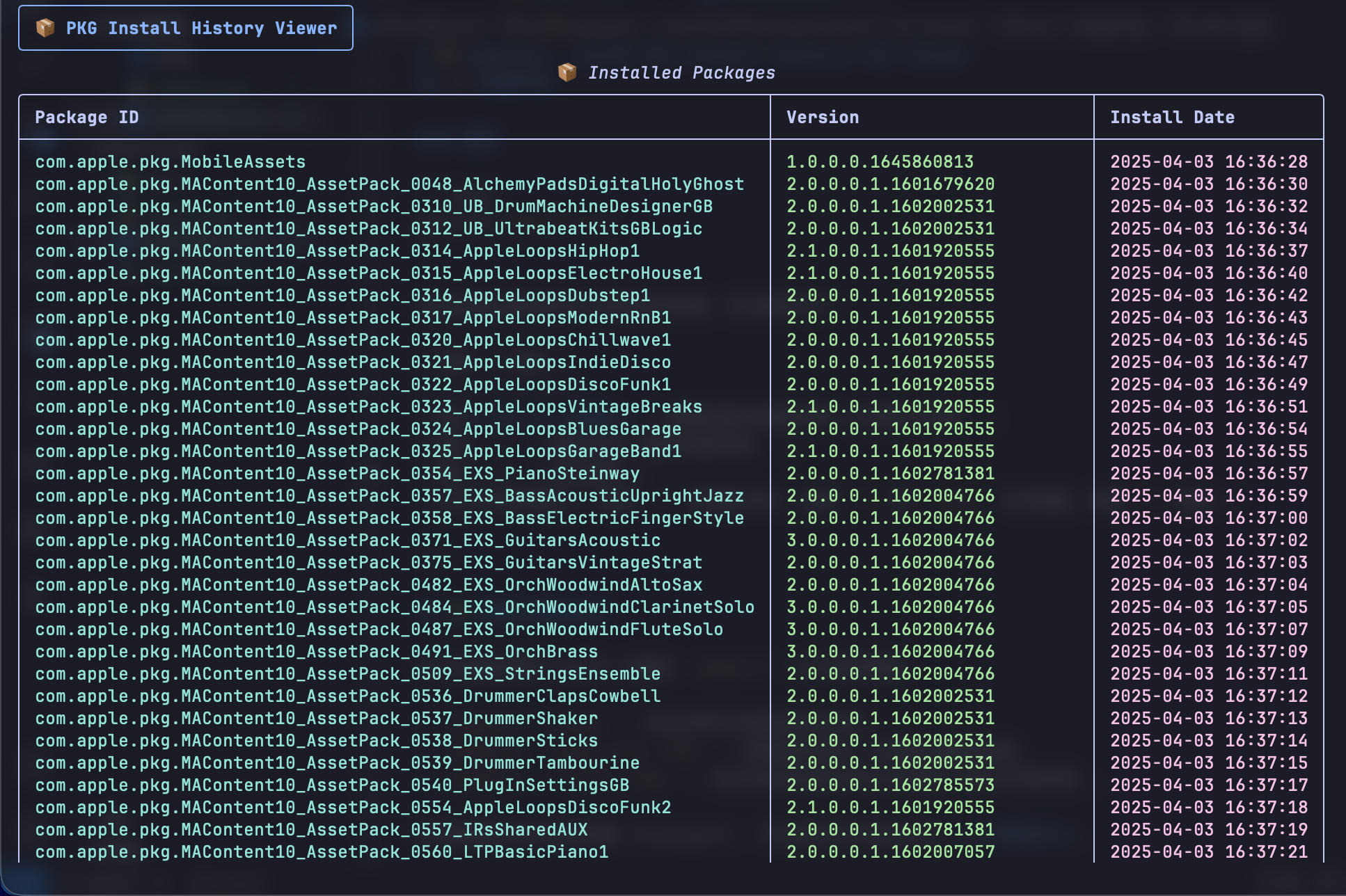
Yalois/mac-pkg-history: macOS PKG Install History TUI Viewer.
有了 pkgutil,理论上我能查任何包的信息。但是效率有点低:
- 每次要敲完整的
pkgutil --pkg-info xxx - 包 ID 很长很难记
- 文件列表显示刷屏,不便于查看
- 想看最近装了什么,得手动排序
我需要一个交互式浏览器。 正好这段时间在用 DeepSeek 做 vibe coding,之前也很早想做这种小项目来练手了,于是就立马开始操作了。
用 DeepSeek 自然语言描述需求 → AI 生成代码 → 跑 → 发现问题 → 描述问题 → AI 改。循环越短效率越高。
好一次提出大体的框架,就算没有具体思路,可以问Deepseek,让它给出设计方案,然后选择。
最终产物:约 150 行 Python,核心依赖只有一个 rich 库。
pip install mac-pkg-history
以后任何 Mac 用户想查 pkg 安装历史,只需:
pip install mac-pkg-history- 运行
mac-pkg-history - 在彩色表格里搜索、浏览、查看文件
PyPI 发布流程
写完代码只是第一步,我的第一个commit只有main.py文件和README文件。
让别人能用 pip install 安装才叫「发布」,于是又重新修改了项目结构。
项目结构
mac-pkg-history/
├── mac_pkg_history/       # 包目录
│   ├── __init__.py
│   └── main.py
├── pyproject.toml          # 打包配置
├── README.md
├── LICENSE
├── .gitignore
pyproject.toml 关键字段
[project]
name = "mac-pkg-history"           # PyPI 全局唯一
version = "0.1.0"                  # 语义化版本,上传后不可覆盖
readme = "README.md"               # 会自动渲染为 PyPI 页面
description = "A TUI tool to view macOS PKG installation history and files" #描述
authors = [
    { name = "Yalois", email = "yalois.xy@foxmail.com" },
]
classifiers = [                    # PyPI 分类标签,帮助别人搜索到
    "Programming Language :: Python :: 3",
    "License :: OSI Approved :: MIT License",
    "Operating System :: MacOS :: MacOS X",
    "Environment :: Console",
]
dependencies = [
    "rich",                        # 运行时依赖
]

[project.scripts]
mac-pkg-history = "mac_pkg_history.main:main"
# 格式:命令名 = "模块.文件:函数名"

[project.urls]
Homepage = "https://github.com/Yalois/mac-pkg-history"
Repository = "https://github.com/Yalois/mac-pkg-history"
Issues = "https://github.com/Yalois/mac-pkg-history/issues"
构建和上传
pip install build twine            # 一次性安装工具

python -m build                    # 生成 dist/*.whl + dist/*.tar.gz
twine upload dist/*                # 按提示输入 API token
API token 在 pypi.org → Account Settings → API tokens 创建,比密码更安全。
更新版本后的流程
1. 修改 pyproject.toml 中 version
2. git commit && git push
3. git tag v0.2.0 && git push --tags
4. rm -rf dist/ && python -m build
5. twine upload dist/*
常见问题
| 问题 | 原因 | 解决 |
|---|---|---|
| twine 403 | 版本号已存在 | PyPI 不允许覆盖,必须递增版本号 |
| pip install 后无命令 | [project.scripts] 未配或路径错 | 检查 模块.文件:函数名 格式 |
| import 报错 | 包目录未被 include | 加 [tool.setuptools.packages.find] |
| 缺依赖 | dependencies 未声明 | 确保所有 runtime 依赖都在此列出 |
GitHub 项目标配
- README.md:一句话说明 + 截图 + 安装方式 + 使用方法(表格)+ 原理 + 声明
- Badge:许可证、Python 版本、平台
- LICENSE:MIT 最宽松
- .gitignore:
__pycache__/、dist/、*.egg-info/、build/
收获
pkgutil三个核心命令及 receipt 机制pyproject.toml完整打包配置python -m build→twine upload发布流程- DeepSeek vibecoding:AI 搭框架 + 人把控交互和边界
- 把命令行知识封装为
pip install可用的工具
评论区
评论加载中...